✦ ✦ ✦

Resto & Cafe Suite

AJ-Corp

One system for your restaurant, cafe & lounge — from the QR on the table, the kitchen and the cashier, to your staff and your books.

± 3 minutes · background music · arrows / swipe to navigate · F for full screen

Narrated by EDI
AJ-CorpRestaurant & Cafe IDENKOJAAR Sign out ×
01 — Dinner rush

Saturday night, every table is full.

Guests order from their phones, kitchen and bar race against the clock, waiters are called from three tables at once, the cashier takes QRIS and cards — and everything has to match the stock and the books tomorrow morning.

  1. Table A04 scans the QR · 4 guests order
  2. Ticket on the kitchen screen · 3 dishes
  3. Bar: 2 mocktails · 1 espresso
  4. Table T03 calls a waiter
  5. Order A04 ready for pickup
  6. Paid by QRIS · receipt printed · table free again
  7. Outlet closed · sales already journalised
02 — One system

From the guest's table to the financial statements.

Menu, orders, kitchen, cashier, stock, staff and accounting share the same data — no double entry, no lost paper tickets. Two languages: Indonesian & English.

AOne system QR menu Table-plan POS Kitchen Bar & Pastry Waiter phone Cashier Stock & Purchasing Accounting HRIS Terminal
03 — QR digital menu

Guests order from their own phones.

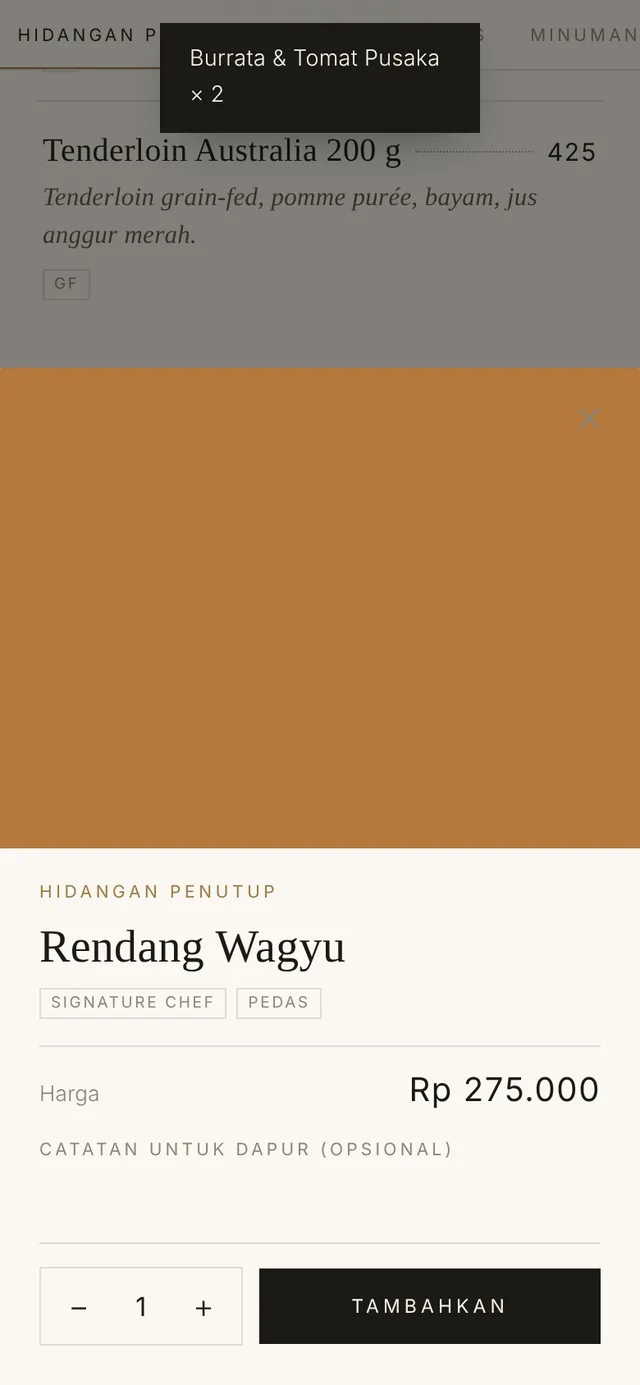
Every table has a QR code. Guests browse an illustrated menu in their language, order, call a waiter or ask for the bill — no app to install. Friends at the same table join with the table PIN.

Menu photos & descriptions Indonesian / English Call a waiter Today's specials
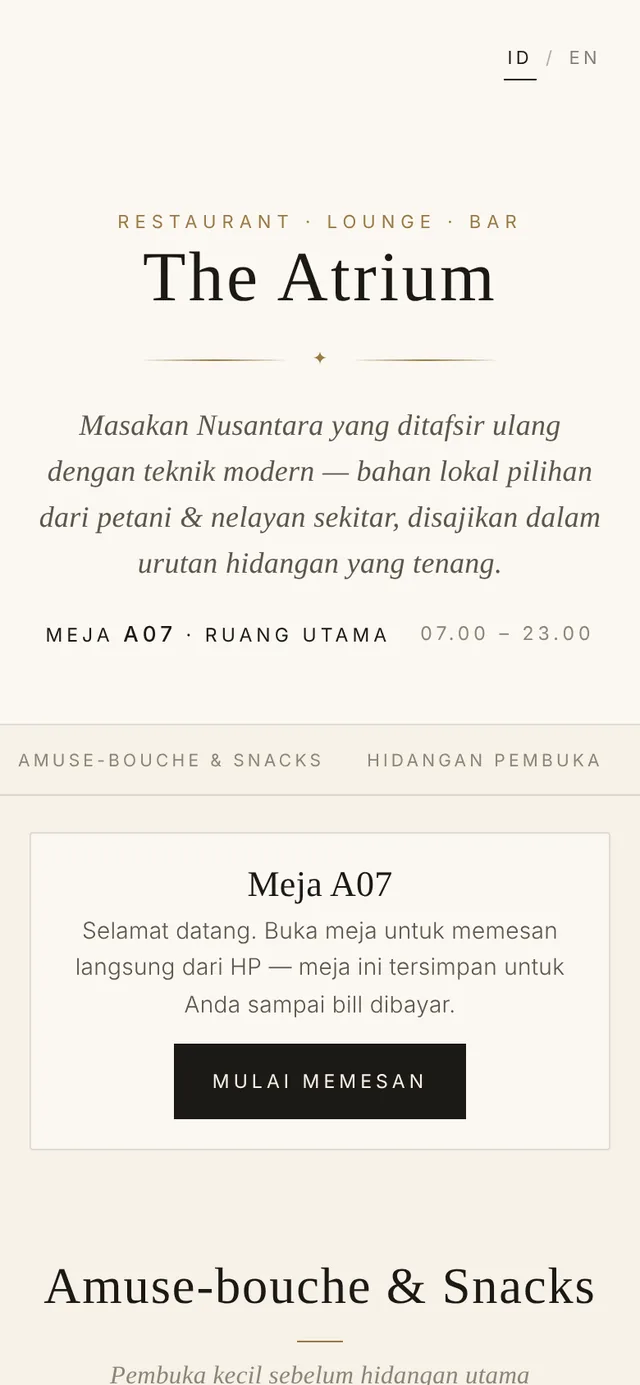
Digital menu on guest phones
Dish details
04 — Table-plan POS

The whole restaurant on one screen.

  • Table plan per area — free, occupied, bill requested, order ready, all shown in colour
  • A table is locked while guests dine and opens again once paid — no mixed-up bills
  • Move tables, merge orders, member discounts & voids with a recorded reason
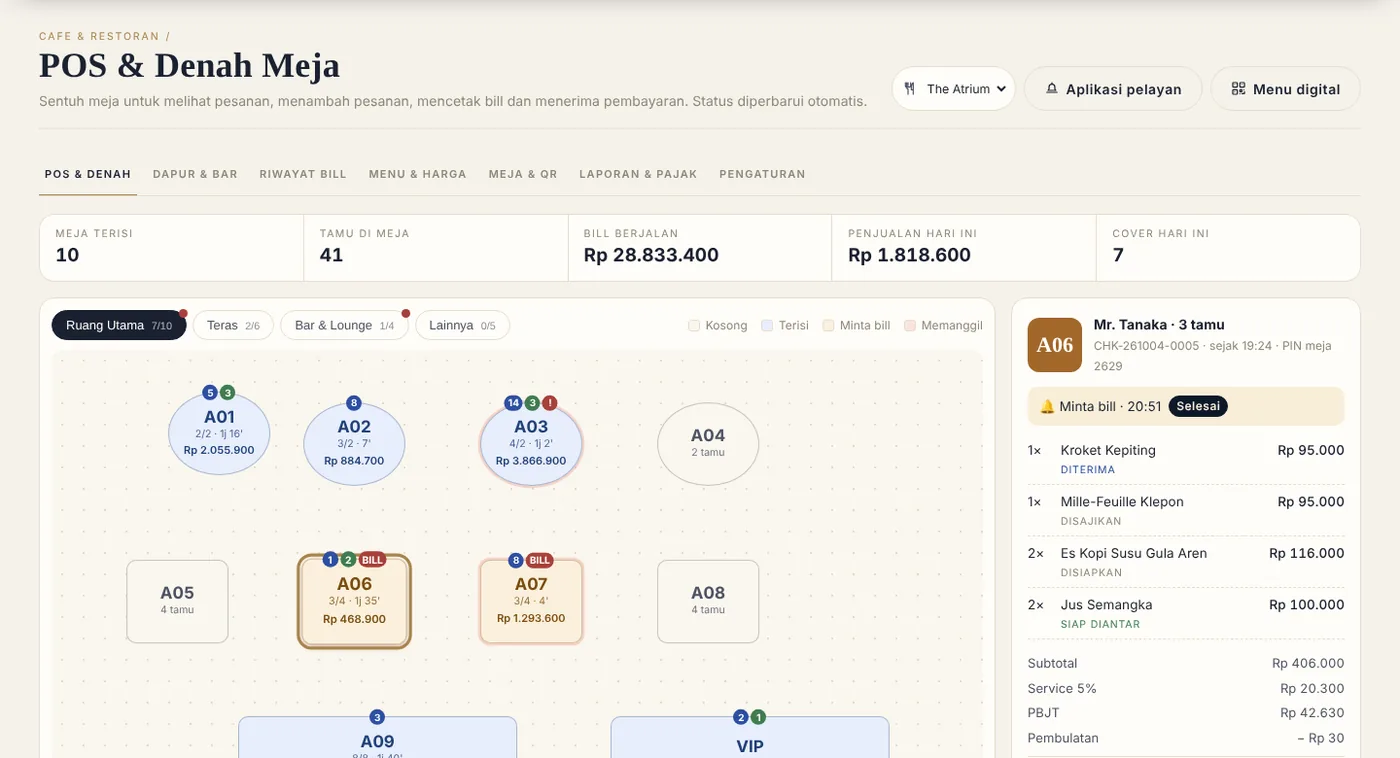
restoran-anda.id/resto/pos
Restaurant table-plan POS
05 — Kitchen, bar & pastry

Tickets reach the right station, instantly.

  • Food to the kitchen screen, drinks to the bar, cakes to pastry — automatically by menu category
  • New → cooking → ready: waiters know right away which orders to serve
  • Every ticket shows its waiting time — the kitchen sees which table has waited too long
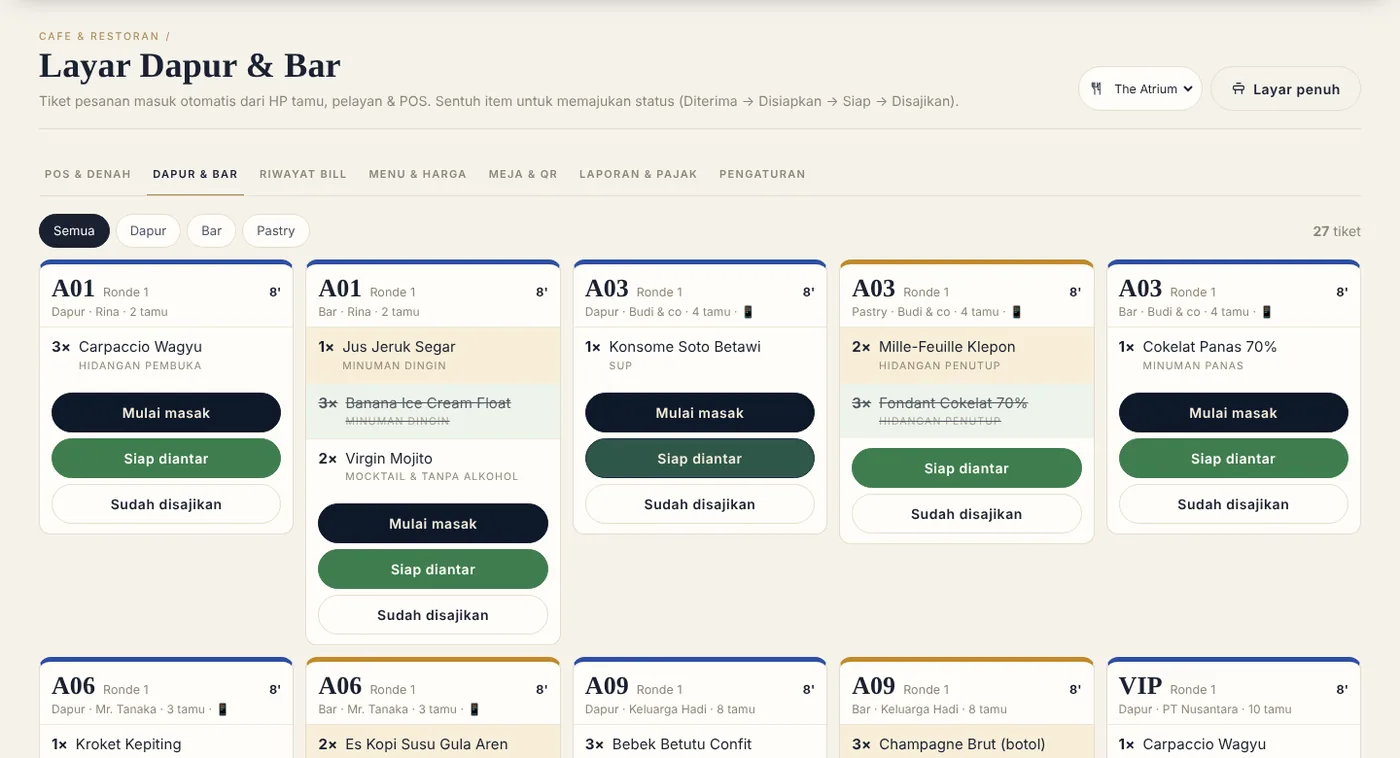
restoran-anda.id/resto/kitchen
Kitchen screen
06 — Waiter app

Waiters move, orders move with them.

Log in with a PIN on the phone. Waiters take orders at the table, receive guest calls, see which orders are ready for pickup and request the bill — no running back and forth to the cashier.

PIN login Table calls Order ready for pickup
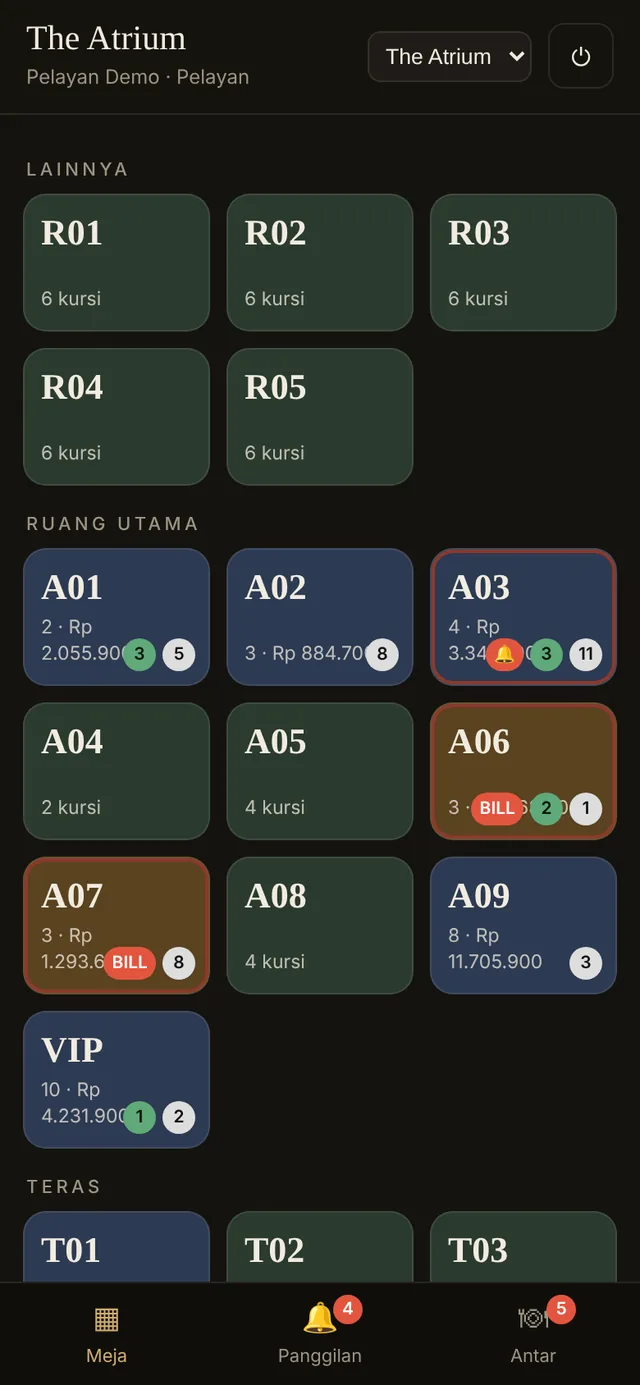
Waiter mobile app
07 — Cashier & payment

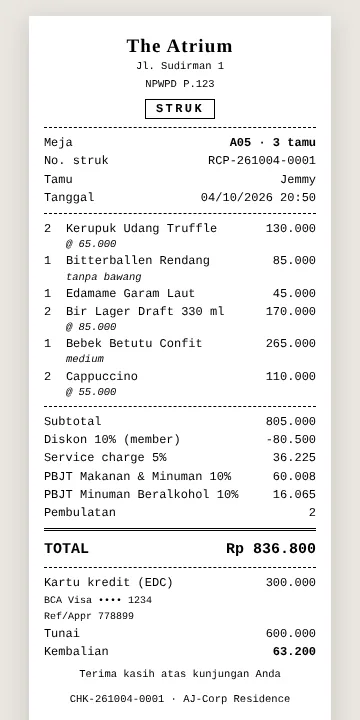
Cash, QRIS, cards — a neat 80 mm receipt.

  • Dynamic QRIS with the bill amount, credit / debit cards on the EDC with approval code
  • Split bills, change, rounding & discounts
  • Service charge & PBJT (restaurant tax) per local regulation, separated for food and alcoholic drinks
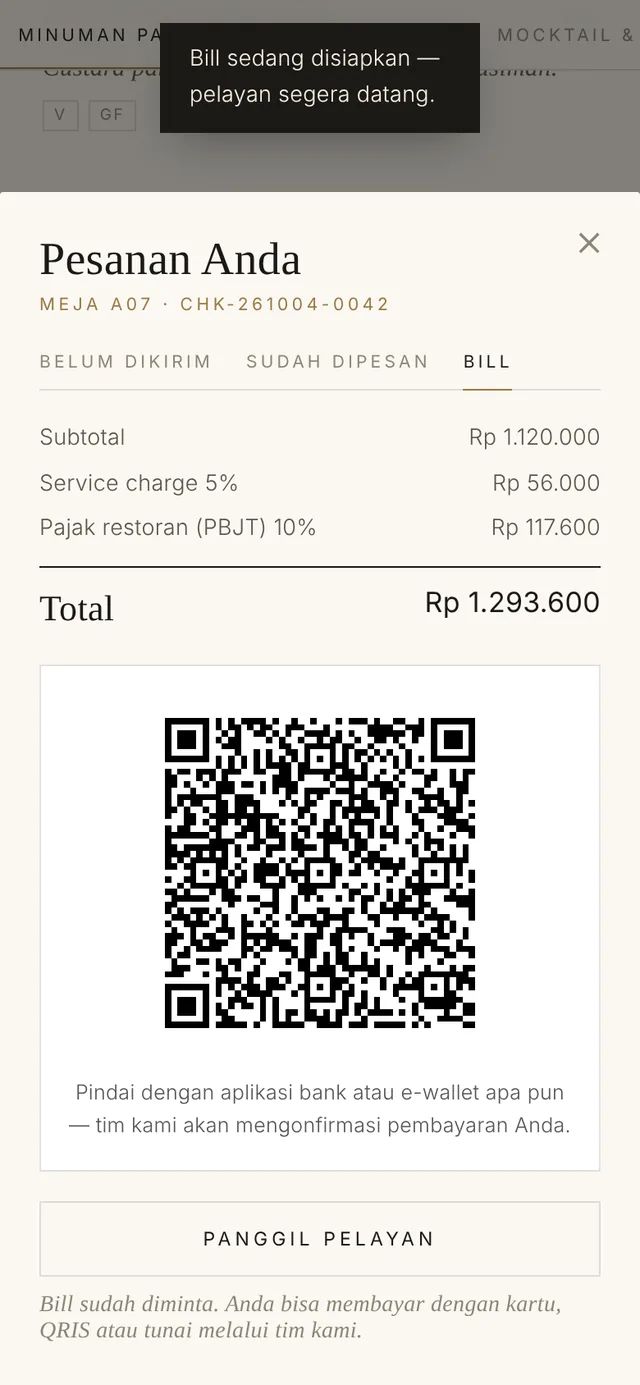
Bill & QRIS
80 mm receipt
08 — Stock & purchasing

Ingredients never run out unnoticed, food cost is no longer a guess.

Kitchen, bar & pastry stockIngredient lists per section, units, minimum and par levels
Purchase orders (PO)Order from vendors straight from the low-stock list — receive the goods and stock goes up
Vendor dataMeat, produce, beverage & packaging suppliers with their contacts
Outlet closing checkCount stock at the end of the day, differences show immediately
Food cost reportIngredient usage compared with sales per period
Today's specialsSpecials appear on the QR menu only on their dates
Inventory valueFlows into the balance sheet automatically through Accounting
TV menu screenMenu & specials shown on the outlet TV screen
09 — Automatic accounting

Today's sales, journalised tonight.

  • A restaurant chart of accounts: food and beverage sales, service charge, PBJT, cash drawer & QRIS
  • POS sales, stock purchases, salaries & BPJS journalise themselves — profit & loss and balance sheet ready any time
  • Vendor bills, PPh 23 / 4(2), tax reports & bank reconciliation
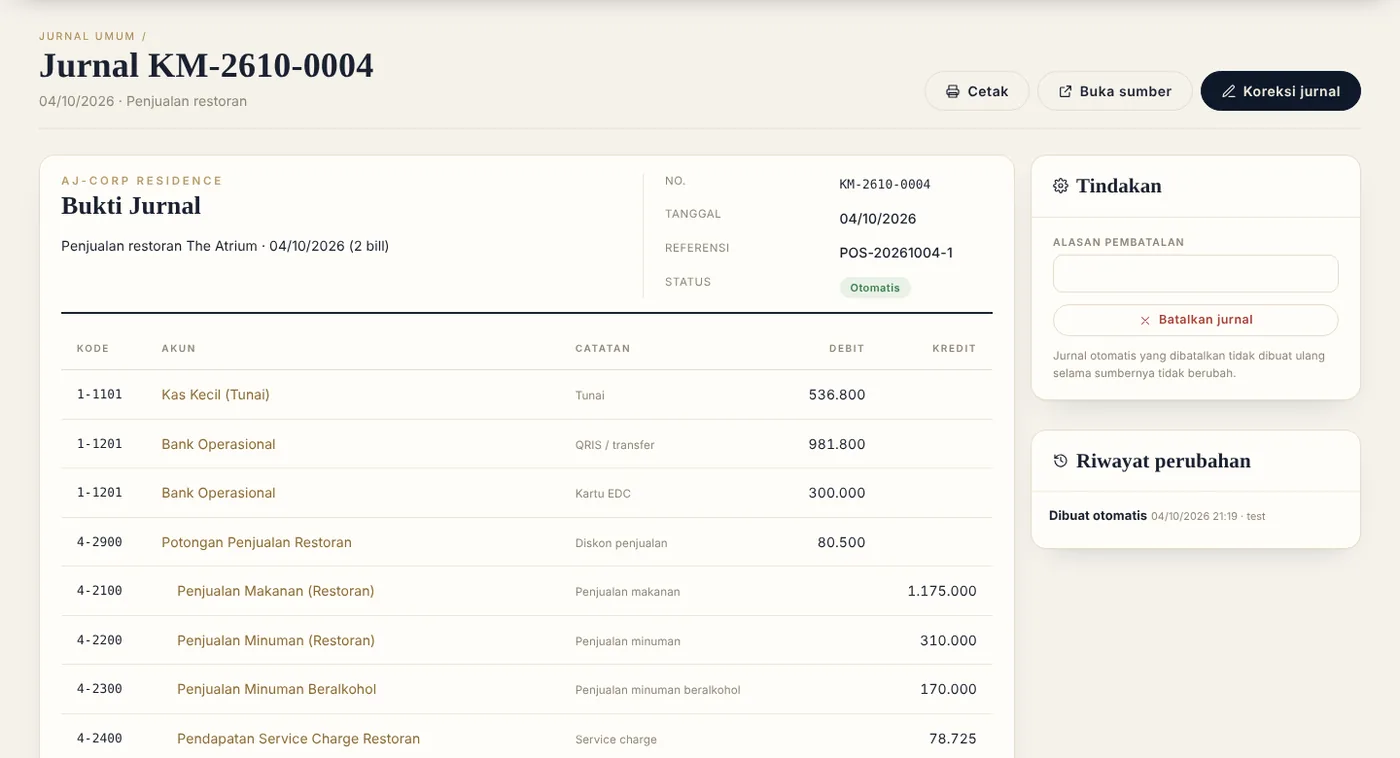
restoran-anda.id/akuntansi/jurnal
Automatic accounting journals
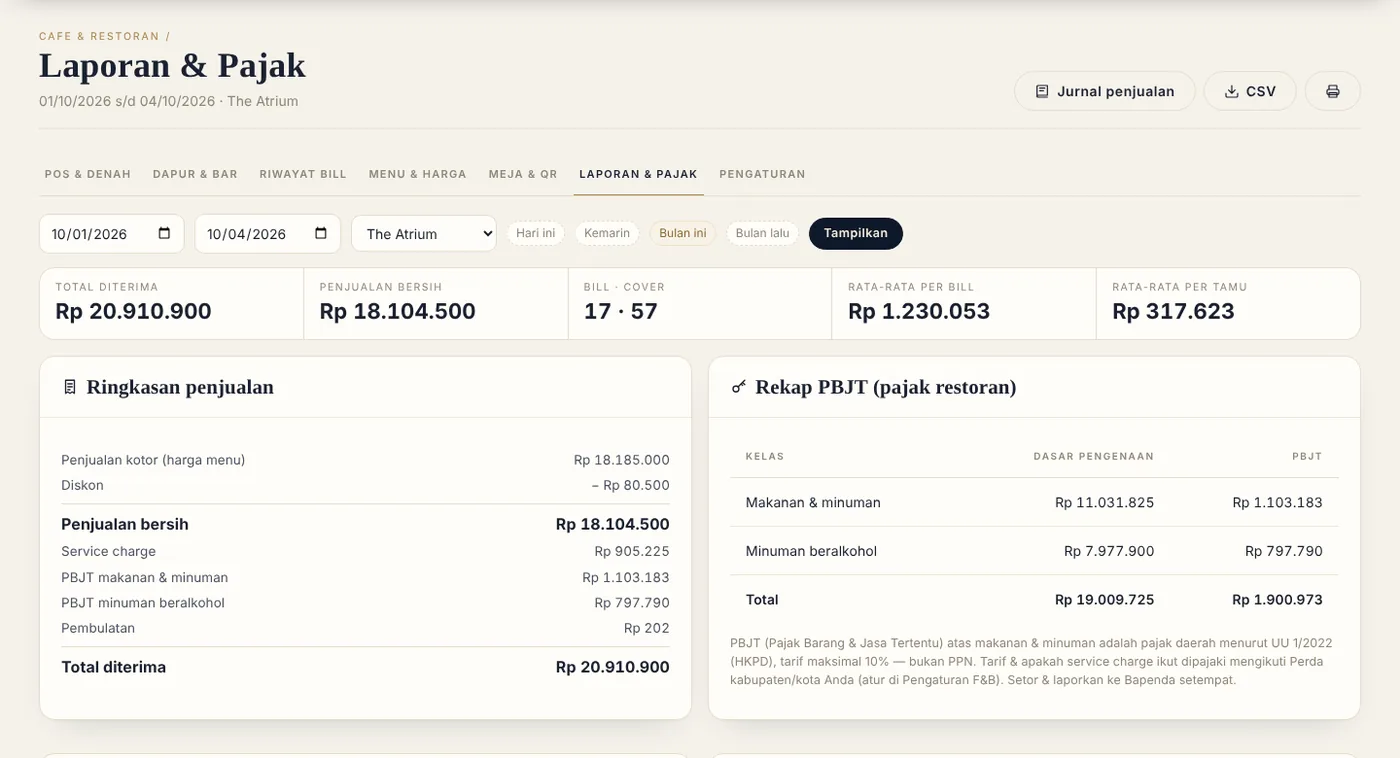
restoran-anda.id/resto/report
Sales & tax report
10 — Staff & access rights

Access rights follow HRIS — automatically.

Register an employee in HRIS and choose the department — the account and access rights follow. Chefs open the kitchen screen, cashiers the POS, Finance the Accounting module. Face attendance from the phone, rosters, leave, payroll & payslips.

ManagementAll outlets & reports Restaurant ServicePOS · waiters · cashier KitchenKitchen screen · stock Bar & BeverageBar · bar cashier Pastry & BakeryPastry · display counter Finance & AccountingAccounting · tax · bank Human ResourcesAttendance · rosters · payroll
11 — Cashier & kitchen terminals

One tablet per station, locked to its department.

Terminal is included free in the package. Staff sign in with a PIN or card — full screen like a cashier program, opening only their own department's screens.

PIN / card loginSwitch staff in 2 seconds, with a record of who is on duty
Locked per departmentThe kitchen cannot open the cashier or accounting
Full screenLike a cashier program — no browser tabs
Install as an appAn icon on the tablet / PC screen that opens straight into the terminal
Print receipts & ticketsReturns to full screen automatically after printing
PINs managed by managersManagers manage the staff of their own department
12 — Devices

Use the devices you already have.

80 mm receipt printerThermal ESC/POS — USB or LAN
Kitchen & bar printersTickets per station over the network
Bank EDC terminalCredit / debit cards, approval codes recorded
QRISDynamic QR with the bill amount
Cashier tablets & PCsAny browser — nothing to install
Waiter phonesAndroid or iPhone, PIN login
TV menuMenu & specials on the outlet screen
Table QRQR stickers / acrylic stands per table, printed from the system
13 — Up and running in a day

Install it yourself: a LIVE site or a DEMO site.

  • LIVE site — start clean and enter your own menu, tables & staff
  • DEMO site — fully populated: staff, a restaurant full of guests, sales history & journals — for team training
  • An official single-file installer, a licence bound to your domain, automatic updates
  1. Upload install.php to your hosting
  2. Enter the licence number
  3. Choose LIVE site or DEMO site
  4. Your restaurant is ready to serve
14 — Our demo restaurant in numbers

Ready from day one.

The demo site is filled like a real restaurant — this is roughly how yours will look.

0Outlets: restaurant, lounge bar & pastry
0Tables & bar seats on the plan
0Staff in 7 departments
0Bills in two weeks
0Modules in one package
0Languages: Indonesian & English
15 — Restaurant & Cafe package

One package, everything a restaurant needs.

An affordable monthly subscription — POS, Accounting, HRIS & Terminal in one package.

F&B Resto & Cafe Suite A standalone restaurant system: table-plan POS, QR digital menu & automatic bookkeeping. We designed this POS system for small businesses (UMKM) starting out, so at a low price you can enjoy a system that would otherwise cost tens of millions of rupiah US$ 49.20 per month Table-plan POS & Cashier POS — orders, payment & 80 mm receipts · An elegant digital menu with a QR on every table, guests order from their phones · Delivery app orders from GoFood, GrabFood & ShopeeFood: straight to the kitchen & bar, commission & reports per app · Waiter phone app, kitchen, bar & pastry screens · Stock & vendor purchasing, outlet closing check & food cost · Cash, QRIS, EDC cards, service charge & PBJT · Cashier / kitchen terminals with staff PIN · Indonesian & English · HRIS — Everything for building staff: phone attendance with face recognition, leave, all the way to payslips…
✦ ✦ ✦

Your restaurant, one system — starting today.

See the Resto & Cafe Suite package or ask our team directly.

See other presentations →